SEO Master
Score-based SEO for ExpressionEngine 7. Per-entry SEO tab with live scoring, variable-based title/description templates, full Open Graph and Twitter/X card support, and a built-in migration tool for SEO Lite Pro.
Requirements
| Requirement | Version |
|---|---|
| ExpressionEngine | 7.x |
| PHP | 7.4 or higher |
Installation
- Copy the
system/seo_masterfolder tosystem/user/addons/ - Copy the
themes/seo_masterfolder tothemes/addons/ - In the Control Panel, go to Add-Ons and click Install next to SEO Master
After installation, an SEO Master tab will automatically appear on every channel entry form, no channel-level configuration needed.
Uninstallation
Go to Add-Ons, find SEO Master, and click Uninstall. This removes both the exp_seo_master_entries and exp_seo_master_settings database tables. Make sure to remove any {exp:seo_master:*} template tags before uninstalling.
The SEO Tab
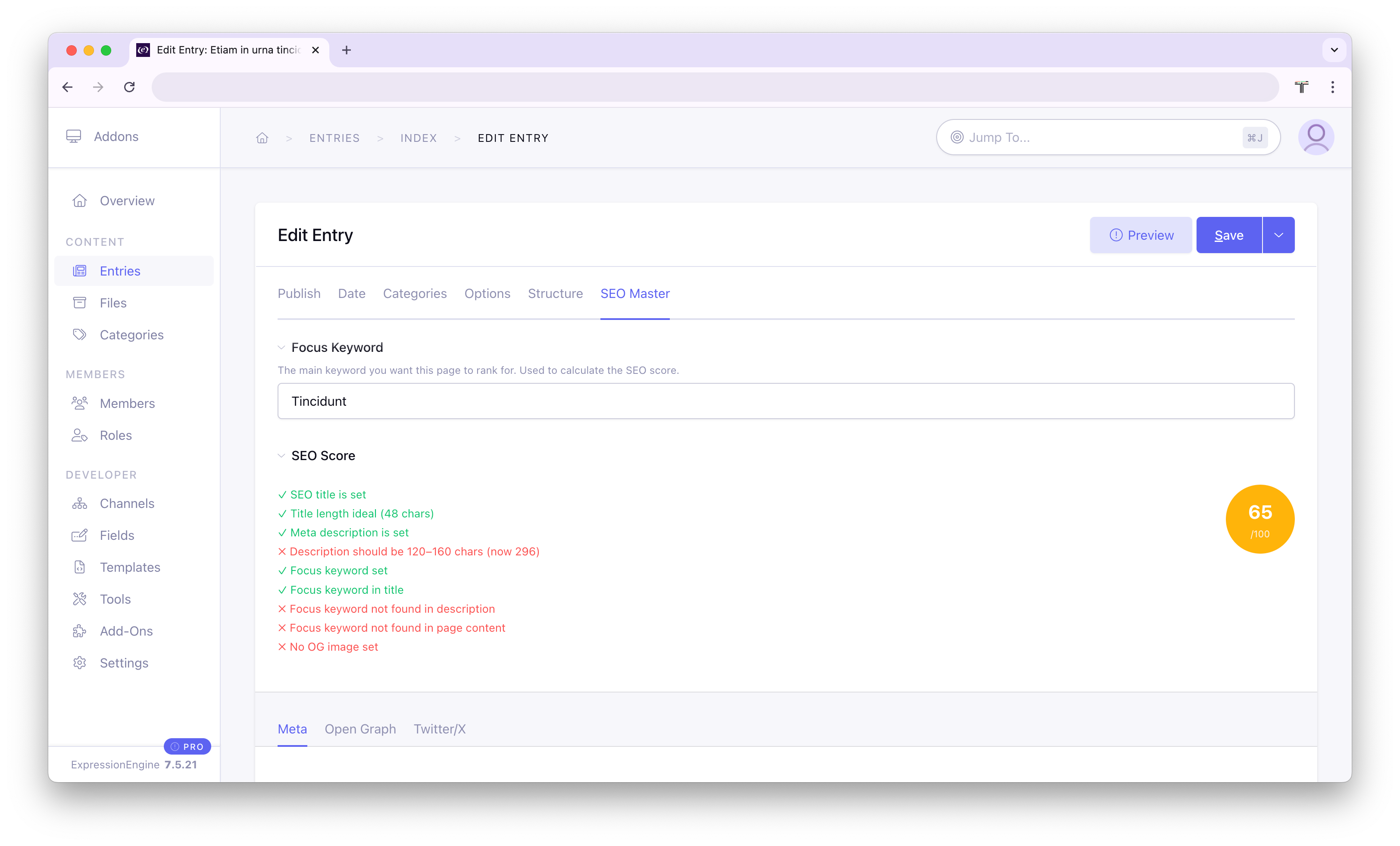
When editing any channel entry, a dedicated SEO Master tab appears at the top of the publish form. It is divided into three sub-tabs: Meta, Open Graph, and Twitter/X.
A Focus Keyword field and a live SEO Score are always visible at the top, regardless of which sub-tab is active.
Meta Tab
| Field | Description |
|---|---|
| Focus Keyword | The primary keyword you want this page to rank for. Used to calculate the SEO score. |
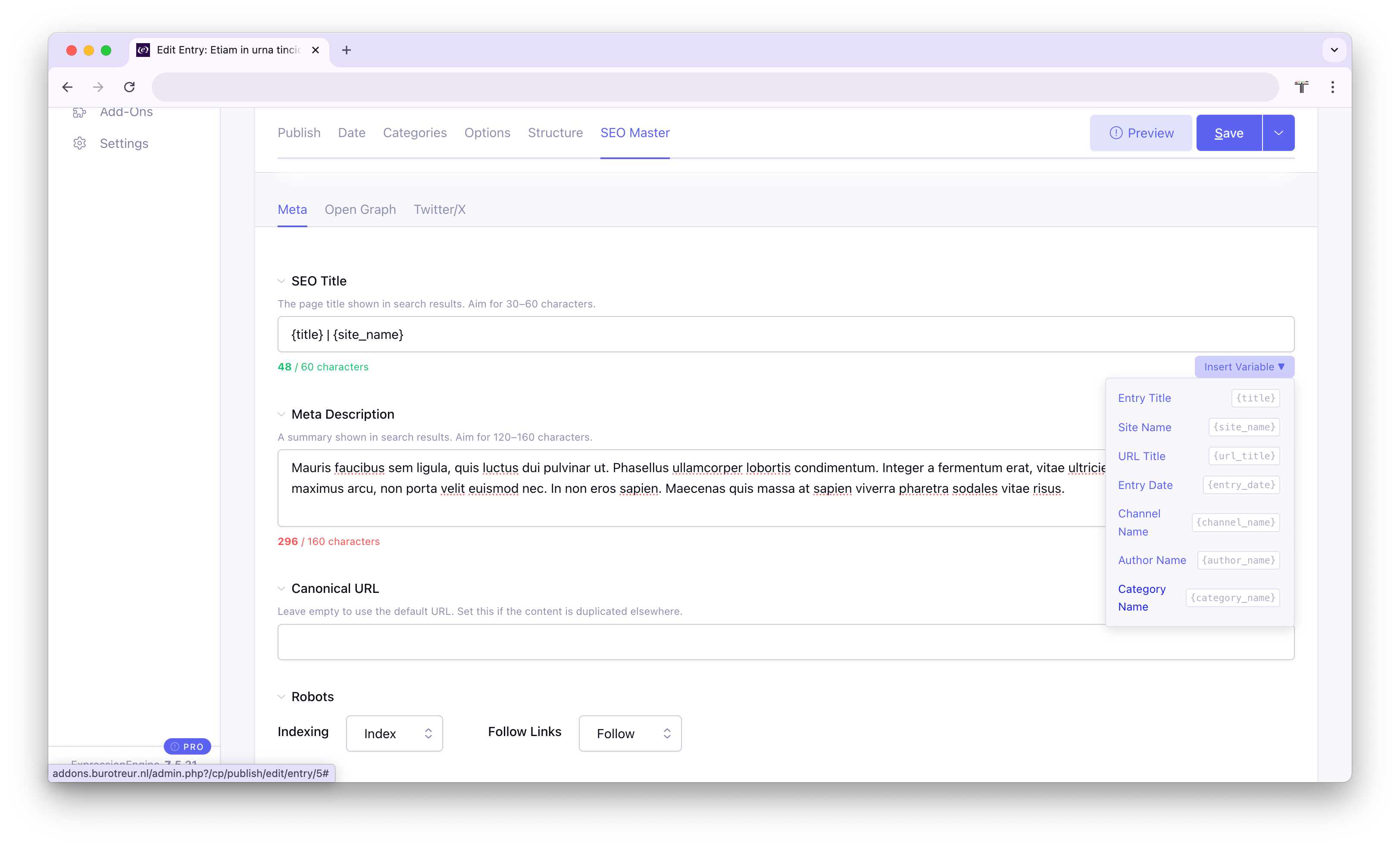
| SEO Title | The <title> shown in search results. Target: 30–60 characters. Supports template variables. |
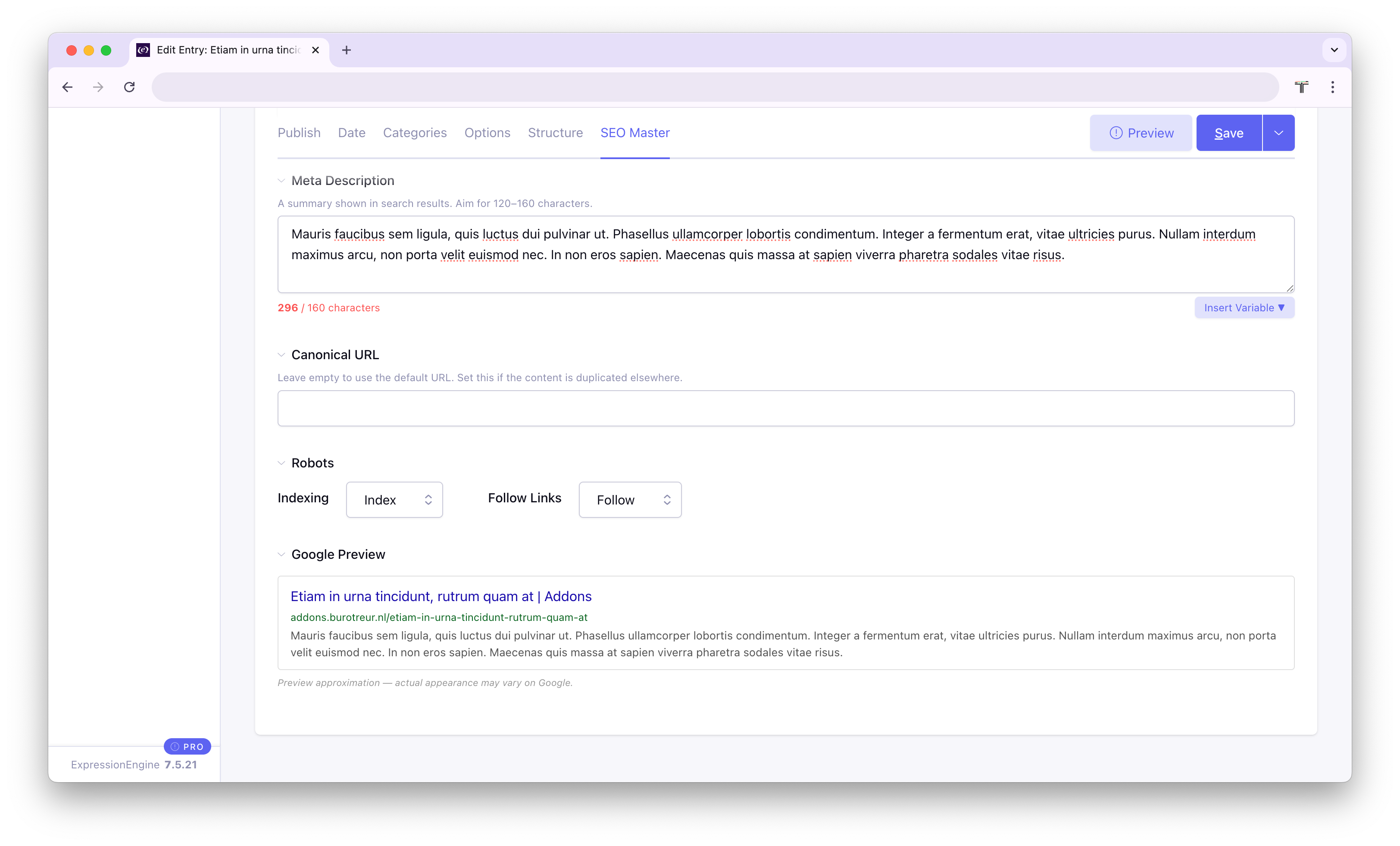
| Meta Description | The snippet shown in search results. Target: 120–160 characters. Supports template variables. |
| Canonical URL | Leave empty to use the entry's default URL. Set this if the content exists at multiple URLs. |
| Robots | Two dropdowns to control robots directives: Indexing (index / noindex) and Follow Links (follow / nofollow). |
| Google Preview | A live approximation of how the entry will appear in Google search results, updating as you type. |
Open Graph Tab
Visible when Open Graph is enabled in Global Settings.
| Field | Description |
|---|---|
| OG Title | Title shown when the page is shared on Facebook or LinkedIn. Can be synced automatically from the SEO Title. |
| OG Description | Description for social sharing. Can be synced from the Meta Description. |
| OG Image | Image displayed in the social share card. Recommended size: 1200 × 630 px. |
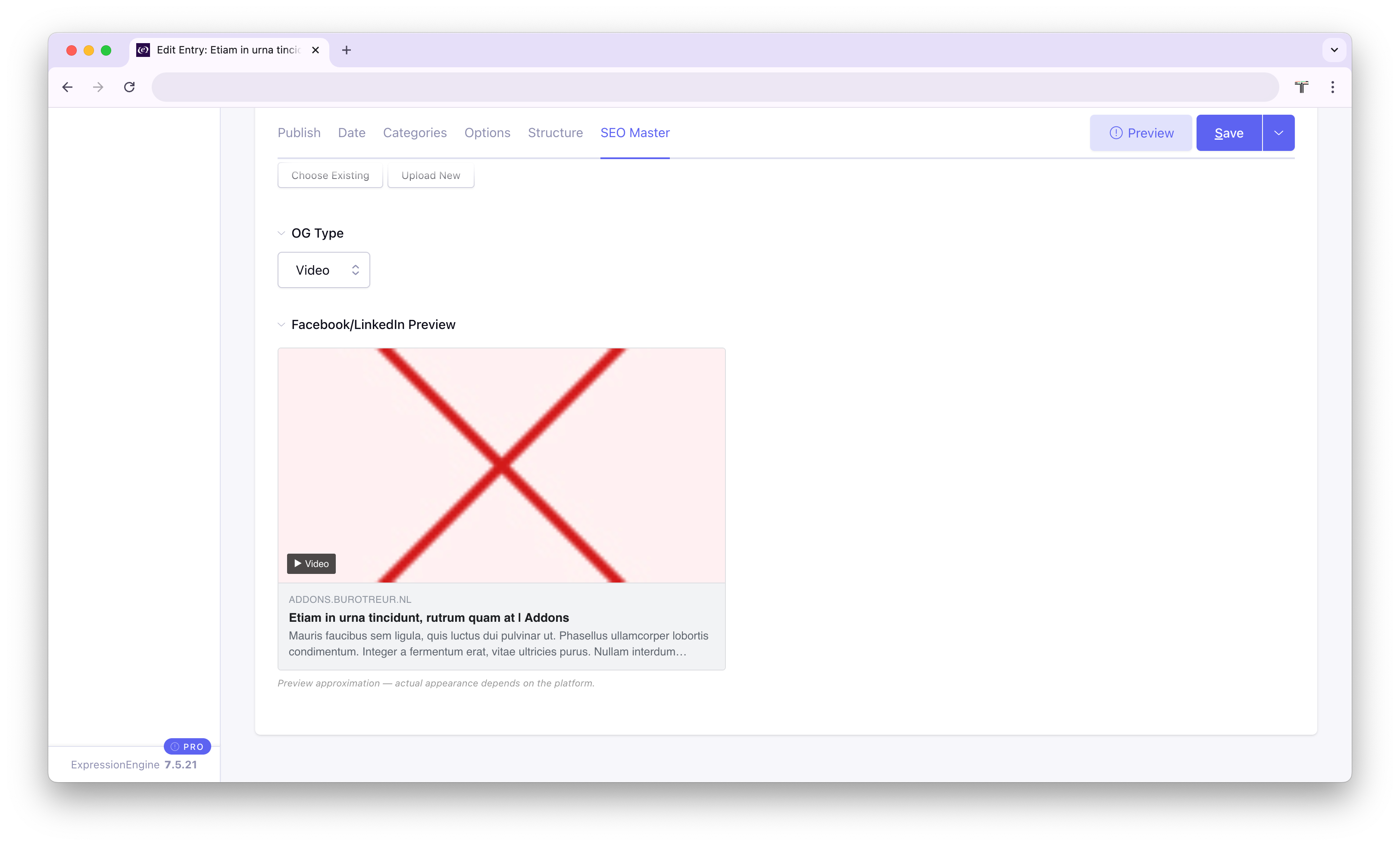
| OG Type | Content type: article, website, product, or video. |
| Facebook/LinkedIn Preview | A live card preview that reflects the current OG fields and image. |
When the Sync OG from meta fields setting is enabled, the OG Title and OG Description fields default to the SEO Title and Meta Description. A checkbox on each field lets editors override this on a per-entry basis.
Twitter/X Tab
Visible when Twitter/X is enabled in Global Settings.
| Field | Description |
|---|---|
| Twitter/X Title | Title shown on Twitter/X cards. Can be synced from the OG Title. |
| Twitter/X Description | Description shown on Twitter/X cards. Can be synced from the OG Description. |
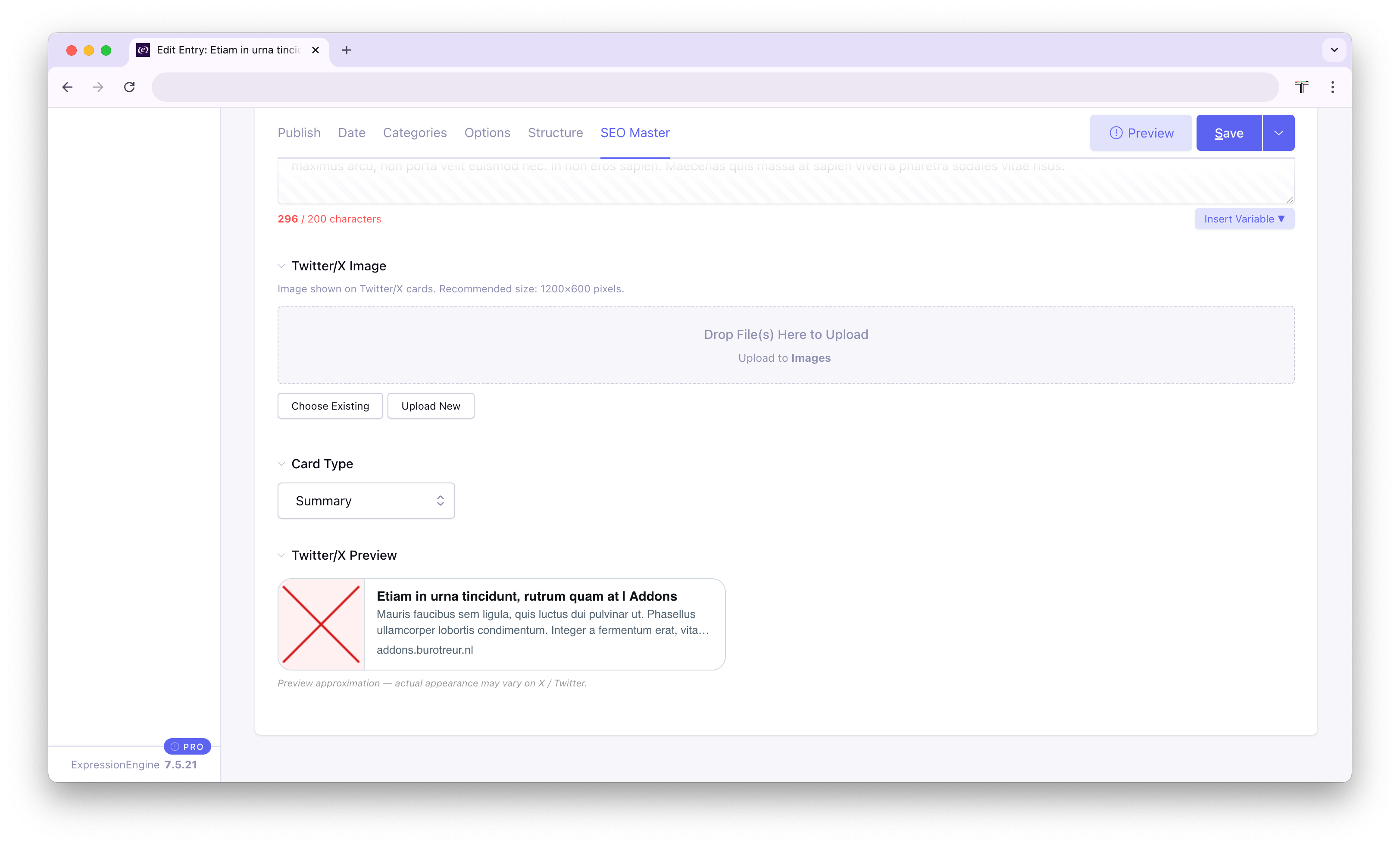
| Twitter/X Image | Image for the card. Recommended size: 1200 × 600 px. |
| Card Type | summary, summary_large_image, app, or player. |
| Twitter/X Preview | A live card preview that updates as you edit, shown in the style of the selected card type. |
SEO Score
The SEO Score gives each entry a score out of 100 based on the content of its SEO fields. It is calculated in real time as editors type and saved when the entry is saved.
| Check | Points |
|---|---|
| SEO title is set | +20 |
| Title length is 30–60 characters | +10 |
| Meta description is set | +20 |
| Description length is 120–160 characters | +10 |
| Focus keyword is set | +5 |
| Focus keyword appears in the SEO title | +10 |
| Focus keyword appears in the meta description | +10 |
| Focus keyword appears in the entry content | +10 |
| OG image is set | +5 |
| Maximum | 100 |
Score colours:
Template Tags
Add the following inside the <head> section of your EE templates to output SEO meta tags.
{exp:seo_master:meta}
Outputs all meta tags at once: title, description, keywords, robots, canonical, Open Graph, and Twitter/X card tags.
{exp:seo_master:meta entry_id="{entry_id}"}Example output:
<title>My Article Title | My Site</title>
<meta name="description" content="A short description of the page.">
<meta name="keywords" content="keyword one, keyword two">
<meta name="robots" content="index,follow">
<link rel="canonical" href="https://yoursite.com/my-article/">
<meta property="og:type" content="article">
<meta property="og:title" content="My Article Title | My Site">
<meta property="og:description" content="A short description of the page.">
<meta property="og:image" content="https://yoursite.com/images/share.jpg">
<meta property="og:site_name" content="My Site">
<meta name="twitter:card" content="summary_large_image">
<meta name="twitter:site" content="@yoursitehandle">
<meta name="twitter:title" content="My Article Title | My Site">
<meta name="twitter:description" content="A short description of the page.">
<meta name="twitter:image" content="https://yoursite.com/images/share.jpg">
OG and Twitter/X tags are only output when those features are enabled in Global Settings. All values are HTML-escaped.
{exp:seo_master:title}
Returns just the resolved SEO title as a plain string, with no surrounding HTML. Useful when you need to output the title separately, for example in a JavaScript variable or a custom <title> wrapper.
{exp:seo_master:title entry_id="{entry_id}"}{exp:seo_master:score}
Returns the stored SEO score (0–100) as a plain integer. Can be used in conditionals or displayed in a dashboard template.
{exp:seo_master:score entry_id="{entry_id}"}Template Variables
Template variables can be used in the SEO Title, Meta Description, OG Title, OG Description, Twitter Title, and Twitter Description fields, both in the Global Settings defaults and on individual entries.
Click the Insert Variable button in any of those fields to pick a variable from a dropdown.
| Variable | Replaced with |
|---|---|
{entry_title} or {title} | The entry's title |
{site_name} | Your site name (from EE System Settings) |
{entry_url} | The full URL of the entry |
{entry_date} | Entry publication date in your ExpressionEngine global date format |
{channel_name} | The title of the entry's channel |
{author_name} | Screen name of the entry author |
{category_name} | Name of the first category assigned to the entry |
Example default title format:
{entry_title} | {site_name}Global Settings
Go to Add-Ons → SEO Master → Global Settings to configure site-wide defaults.
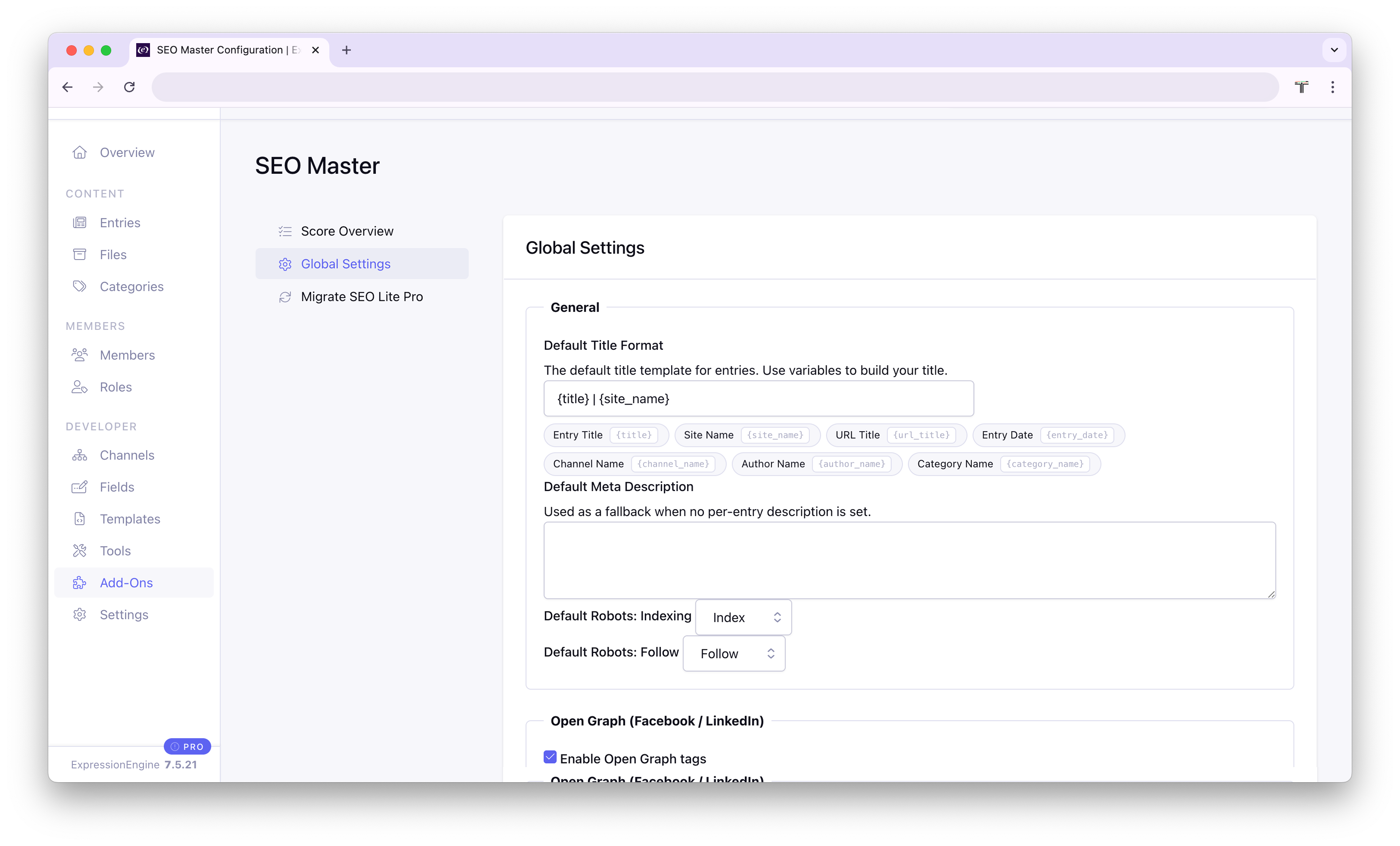
General
| Setting | Description |
|---|---|
| Default Title Format | Template used when an entry has no custom SEO title. Supports template variables. Default: {title} | {site_name} |
| Default Meta Description | Fallback description used when an entry has no custom meta description. |
| Default Robots: Indexing | Site-wide default for the robots index directive (index or noindex). |
| Default Robots: Follow | Site-wide default for the robots follow directive (follow or nofollow). |
Open Graph (Facebook / LinkedIn)
| Setting | Description |
|---|---|
| Enable Open Graph tags | Toggles all og:* meta tags on or off globally. |
| Sync OG fields from meta fields | When enabled, OG Title and OG Description default to the SEO Title and Meta Description. Editors can override per entry. |
| Site Name | Value for og:site_name. Supports template variables. Defaults to {site_name}. |
| Default OG Type | Fallback og:type value: article, website, product, or video. |
| Default OG Image | Fallback image for og:image when no per-entry image is set. Recommended: 1200 × 630 px. |
Twitter / X
| Setting | Description |
|---|---|
| Enable Twitter/X card tags | Toggles all twitter:* meta tags on or off globally. |
| Sync Twitter fields from OG fields | When enabled, Twitter Title and Twitter Description default to the OG values. Editors can override per entry. |
| Twitter/X Site Handle | Your site's Twitter/X handle, e.g. @yoursite. Output as twitter:site. |
| Default Card Type | Fallback card type: summary, summary_large_image, app, or player. |
| Default Twitter/X Image | Fallback image for twitter:image when no per-entry image is set. Recommended: 1200 × 600 px. |
Control Panel Dashboard
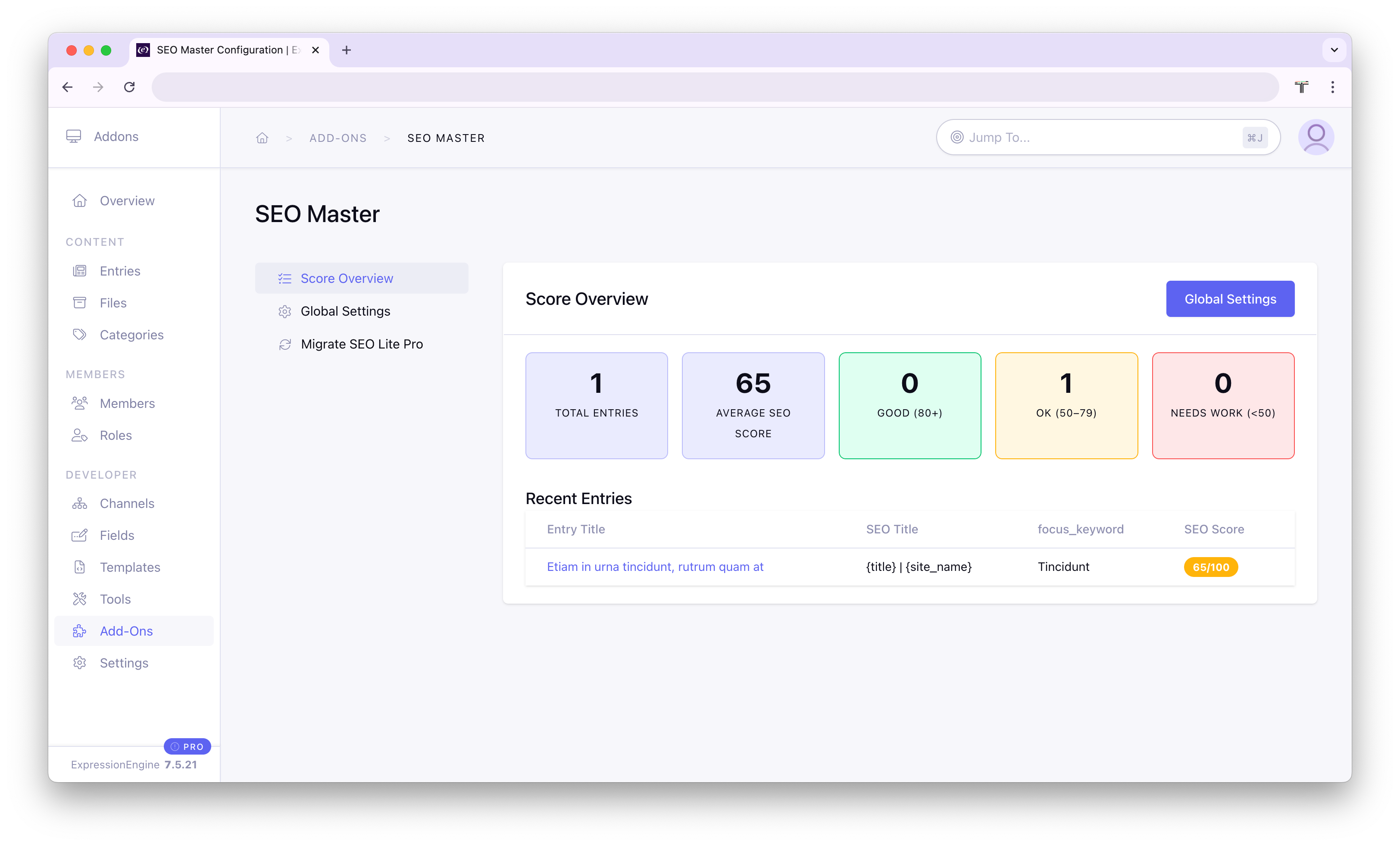
Go to Add-Ons → SEO Master to see an overview of SEO health across your site:
- Total entries that have SEO data
- Average SEO score across all entries
- Score breakdown: how many entries are Good (80+), OK (50–79), or Need Work (<50)
- A table of the 10 most recently edited entries, with their title, SEO title, focus keyword, and score
Migrating from SEO Lite Pro
SEO Master includes a one-way migration tool that reads all per-entry data from SEO Lite Pro and imports it into SEO Master. Your SEO Lite Pro data is never modified or removed.
Navigate to Add-Ons → SEO Master → Migrate SEO Lite Pro. The page shows whether the SEO Lite Pro database table (exp_seolite_content) was found, how many entries are available to import, and how many entries already have SEO Master data.
Field Mapping
| SEO Lite Pro | SEO Master |
|---|---|
title | SEO Title |
description | Meta Description |
keywords | Meta Keywords |
og_title | OG Title |
og_description | OG Description |
og_image | OG Image |
twitter_title | Twitter/X Title |
twitter_description | Twitter/X Description |
twitter_image | Twitter/X Image |
Note: The Robots Directive field is not currently migrated.
Conflict Mode
When an entry already has SEO Master data, you can choose how to handle it:
- Skip, keep the existing SEO Master data unchanged
- Overwrite, replace the existing data with the SEO Lite Pro values
After Migration
The migration result shows how many entries were inserted, updated, or skipped. After a successful migration, update your EE templates to use the {exp:seo_master:meta} tag in place of any SEO Lite Pro tags.
Database Tables
exp_seo_master_entries
Stores per-entry SEO data. One row per entry per site.
| Column | Type | Description |
|---|---|---|
id | INT | Auto-increment primary key |
entry_id | INT | EE entry ID |
site_id | INT | EE site ID |
seo_title | VARCHAR(512) | SEO title (may include template variables) |
seo_description | TEXT | Meta description |
seo_keywords | VARCHAR(512) | Meta keywords |
focus_keyword | VARCHAR(255) | Focus keyword used for scoring |
canonical_url | VARCHAR(512) | Custom canonical URL |
robots_index | VARCHAR(20) | index or noindex |
robots_follow | VARCHAR(20) | follow or nofollow |
og_title | VARCHAR(512) | Open Graph title |
og_description | TEXT | Open Graph description |
og_image | VARCHAR(1024) | OG image file reference |
og_type | VARCHAR(50) | OG type (article, website, etc.) |
twitter_title | VARCHAR(512) | Twitter/X card title |
twitter_description | TEXT | Twitter/X card description |
twitter_image | VARCHAR(1024) | Twitter/X image file reference |
twitter_card | VARCHAR(50) | Twitter/X card type |
seo_score | TINYINT | Calculated SEO score (0–100) |
exp_seo_master_settings
Stores global settings as key/value pairs, one row per setting per site.
| Column | Type | Description |
|---|---|---|
id | INT | Auto-increment primary key |
site_id | INT | EE site ID |
setting_key | VARCHAR(100) | Setting name |
setting_value | TEXT | Setting value |
Changelog
1.1.0- Added default OG image and default Twitter/X image settings
- Added sync checkboxes on OG and Twitter/X fields in the entry tab
- Added live Open Graph preview (Facebook/LinkedIn card style)
- Added live Twitter/X preview (all four card types)
- Added migration tool for SEO Lite Pro
1.0.0- Initial release